Extron Case Study – Extron AV Technology Powers First-in-Nation K‑12 Cyber Innovation Center at Canyon Springs High School

canyon-springs1

With a recent ribbon cutting, the Moreno Valley Unified School District in Riverside County, California, opened its Cyber Innovation Center at Canyon Springs High School. This is the first center of its kind for a K-12 public school district, according to the National Initiative for Cyber Education. The late Aaron Barnett, IT Director of Moreno Valley USD, and Donna Woods, MSc.Ed., the Center’s current lead instructor, have championed the cybersecurity pathway program since its inception seven years ago. The Cyber Innovation Center is the program’s permanent home. Here, students gain knowledge and skills in computer network maintenance and cybersecurity, earning six college credits and preparing to pass CompTIA A+ and Networking+ certification tests. These certifications are the gold standard for IT skills competency.

Integral to the teaching and esports competition activities at the Center is an extensive audiovisual system powered by Extron switching, distribution, control, and audio, with NAV® Pro AV over IP at the center of AV signal distribution throughout the facility.


CHALLENGES

To create the Cyber Innovation Center, 7,687 square feet of underused auto and wood shop space was converted to a technology-rich teaching venue. The main teaching spaces are an Esports Computer Lab, a Cyber Classroom, and a Cyber Innovation Lab. These serve as classrooms and as competition venues for esports and CyberPatriot National Youth Cyber Defense contests. The center also houses mentoring conference rooms and hands-on workstations with server racks and network equipment.

The labs feature exposed overhead cable trays that place network cables on full display, befitting the IT-centric subjects being taught. Sleek drop ceiling treatments and multicolored LED room lighting are used in the reception area, classrooms, and mentoring rooms, creating a high-tech atmosphere reflective of the Center’s STEM mission, while providing room acoustics conducive to effective teaching.

The Cyber Innovation Center programs inspire students to become more involved in school. Our students are excited and eager to come to class and learn new skills. Through the construction and equipment available, we hope they feel supported by everyone who had a part in this incredible milestone.

Board Member and past Board President,
Moreno Valley Unified School District
(Remarks in address made at the Cyber Innovation Center dedication ceremony)
 

DESIGN SOLUTION

Esports Computer Lab

The Esports Computer Lab is equipped with 36 high-performance gaming computer workstations with 240 fps displays, three 84″ flat panel displays, eight ceiling-mounted FF 120T Flat Field® speakers, and a ceiling-mounted SF 10C SUB SoundField® subwoofer.

NAV Pro AV over IP Network Distributes Gaming Action

The gaming workstations are set up in six rows of six stations each. A six-input SW HD 4K PLUS HDMI switcher preselects HDMI content from among the six workstations in each row, feeding the selected HDMI via a NAV encoder to the NAV Pro AV over IP network. The instructor can easily select which content is shown on the large displays throughout the Cyber Innovation Center using an Apple iPad® running the Extron Control app. Spectators can watch gaming action on any display in the building, including the three 84″ flat panel displays lining the walls of the Esports Lab and an 18′ x 6′ videowall in the Cyber Innovation Lab. Gaming video and audio content is also sent to a Tricaster®, which is used to store gaming action for playback, mix the gaming action with content from other sources, and stream the gaming content to the Internet during competitions with other schools.

Four DTP® wallplate transmitters located around the Esports Lab accept HDMI and analog audio from mobile 86″ interactive touchscreen teaching stations. Instructors and coaches use the teaching stations to create and annotate lesson material, draw gameplay diagrams, and other teaching aids. The wallplates connect to the NAV Pro AV over IP network via NAV E 101 DTP encoders, allowing content from the mobile touchscreens to be shown on other displays around the facility. A ShareLink® Pro wireless hub connects to the NAV Pro AV over IP network via a NAV encoder, allowing mobile devices to provide content wirelessly via Wi-Fi.

Powerful Gaming Audio.

Audio is an important part of the gaming experience. The players hear the gaming action through their headphones. Spectators listen to the same gaming action, plus shoutcaster commentary, with immersive sound coming through the Esports Lab’s eight full range ceiling speakers and the powerful in-ceiling subwoofer. The sound is mixed, tailored for room acoustics, and distributed by a DMP 64 Plus audio DSP processor, which drives the ceiling speakers through an XPA® 4-channel amplifier with 100 watts per channel. A separate 800-watt NetPA® amplifier with integrated DSP drives the subwoofer. Audio is delivered to the DSP processor and the subwoofer amplifier digitally via the AES67-compatible NAV Pro AV over IP network.

Cyber Classroom

The Cyber Classroom has 48 computer workstations organized in rows of six, four 84″ flat panel displays, and eight SF 26PT SoundField pendant speakers. The classroom also has mentoring conference rooms, each with a 75″ flat panel display for collaboration sessions.

The Cyber Classroom AV system is essentially the same as the Esports Computer Lab system described earlier. There are more computer workstations and displays in the Cyber Classroom, so there are more HDMI switchers and more NAV Pro AV over IP endpoints. This is where NAV proves its versatility, allowing AV installations to grow by simply adding encoders and scaling decoders. Users control the AV system from a TouchLink GUI on an iPad, just as in the Esports Lab. The same DSP-equipped sound system that drives the Flat Field speakers in the Esports Lab drives the pendant speakers in the Cyber Classroom, via a separate XPA Ultra amplifier. Similar to the Esports Lab, the Cyber Classroom has DTP wallplates where mobile interactive touchscreen teaching stations can plug into the NAV Pro AV over IP network to share lesson content to other screens around the building.

Cyber Innovation Lab

The Cyber Innovation Lab includes 24 computer workstations on two tables, with six workstations on either side of each table. The primary display in this room is the videowall comprised of a 5×3 matrix of 49″ flat panel displays. Adjoining the Cyber Innovation Lab is a Tech Training Room.

The AV system in the Cyber Innovation Lab follows the same design as the other rooms: HDMI switches pre-selecting HDMI content from each group of six workstations feeding into the NAV Pro AV over IP network. That network supports the videowall with NAV WindoWall® technology, feeding the 15 flat panel displays through 15 NAV scaling decoders. Four pendant speakers hang from the ceiling and are driven by their own separate amplifier located in the Intermediate Distribution Frame (IDF) equipment room. There are three DTP wallplates where mobile interactive touchscreen teaching displays can plug into the NAV Pro AV over IP network.

The tech training room includes tabletop demonstration equipment that students can practice on to gain hands-on experience. The demo equipment varies according to the lesson plan, but a NAV AV over IP encoder/decoder pair and a ShareLink Pro are dedicated units in this room.

Lobby

The lobby houses the Center Director’s office and is where staff greets students and visitors. An 82″ display shows a rotating array of scheduling information, content from classrooms and labs, and esports gaming action, all supplied via the NAV Pro AV over IP network.

IDF Equipment Room

This room houses network switching equipment, NAV Pro AV over IP equipment, audio amplifiers, and AV system control equipment.

AV System Control.

Two control processors manage operation of the AV system in response to user selections entered from TouchLink® touchpanels or wirelessly from iPads running the Extron Control app. A NAVigator System Manager configures, manages, and controls NAV Pro AV over IP endpoints.

Student Access to IDF.

Under supervision of IT staff technicians, students participate in network maintenance and are exposed to the stress of working on a live network, where any mistakes would impact network users. It’s a valuable real-world experience for students in their journey to becoming certified IT professionals.

The AV systems provide a high-level impact and excellent impression to visitors and participants engaged in our community outreach programs.


RESULTS

Over 700 students at four middle schools and three high schools are enrolled in the Cyber Academic Pathway program. As the hub of the program, the Cyber Innovation Center serves as an education facility, an esports and National Youth Defense competition venue, and a cybersecurity training resource for the community’s small businesses, veterans, and others.

Moreno Valley USD is a member of the CompTIA Academic Partner Program, which assists schools in recruiting, training, and certifying students in IT. Alumni of the Cyber Academic Pathway program are employed in well-paying software security and IT positions at firms such a Crowdstrike, Google, Yahoo, and the U.S. Space Force, to name a few.

Such student successes are all the more impressive because Moreno Valley USD qualifies for the federal Title I education program that supports low-income students. Beyond that, Donna Woods, teachers Ana Velazquez and Mary Baez elaborate that, “Successes are not limited to the top academic students. We have cyber career pathway students from special-ed and English as a second language learners. It’s amazing when you see them working together. Every child feels welcome and participate in the Cyber Education Center educational offerings regardless of their academic knowledge or wherewithal.”

Extron is proud of its role in contributing to this success story with its industry-leading switching, distribution, control, and audio products that are at the heart of the Cyber Innovation Center AV systems.

Extron collaborated with our instructors during AV system design to understand specific uses and applications for each course. As Extron customized the AV systems, they provided training and support during and after installation. They were exemplary in follow-up as instructors began using the system, verifying everything was running effectively.

Donna Woods, MSc.Ed
Moreno Valley Unified School District


Featured Extron Products

Model Description
NAV E 101 1G Pro AV over IP Encoder – HDMI
NAV E 101 DTP 1G Pro AV over IP Encoder with DTP Input
NAV SD 101 1G Pro AV over IP Scaling Decoder – HDMI
NAVigator Pro AV over IP System Manager
SW HD 4K PLUS Series 4K/60 HDMI Switchers with Ethernet Monitoring and Control
DTP T HWP 4K 331 D Long Distance DTP Transmitter for HDMI – Decorator-Style Wallplate
ShareLink Pro 500 Wired and Wireless Presentation Gateway
DMP 64 PLUS C AT 6×4 ProDSP Audio DSP Processor with AEC and Dante
AXI 016 Sixteen Output Audio Expansion Interface for DMP Plus Series system
XPA U 1004 Four Channel Low and High Impedance Amplifiers – 100 Watts Per Channel
NetPA U 8001 SUB Mono Subwoofer Amplifier with Dante and DSP – 800 watts
FF 120T Full-Range Flat Field Speakers with Low Profile Enclosure and 70/100 V Transformer
SF 26PT SoundField 6.5″ Two-Way Pendant Speaker
SF 10C SUB SoundField In-Ceiling Subwoofer
IPCP Pro 250 xi IPCP Pro xi Control Processor
IPCP Pro PCS1 xi IPCP Pro xi Power and Device Control Processor
TLP Pro 1225MG 12″ Wall Mount TouchLink Pro Touchpanel
Extron Control App Control App for TouchLink, eBUS, Network Button Panels, and MediaLink

Telycam Case Study – NDI®-Driven Production: A Fully AVoIP Broadcast for Puff’s 14th Anniversary

The 14th anniversary of Puff was a milestone celebration—not just for the event itself, but also for the cutting-edge technology that made it happen. This broadcast was a true testament to the future of live production, featuring a 100% AVoIP workflow with zero reliance on traditional HDMI or SDI cables beyond 10 cm. Instead, the entire production ran on LAN and fiber connections, delivering unmatched efficiency and flexibility.

At the heart of this seamless operation was the powerful NDI® ecosystem, made possible through a collaboration between Telycam & Kiloview. Telycam’s NDI®|HX PTZ cameras captured every moment with crystal-clear image quality, smooth auto-tracking, and low-latency performance, ensuring a professional-grade broadcast. These cameras, integrated with Kiloview’s encoders, decoders, and software management solutions, enabled a fluid and responsive production environment.

Weixin Image_2026-06-04_092736_767 (1)

Why Choose Telycam?

For this event, our Explore SE and Vision+ SE NDI® PTZ cameras were the perfect fit.

The integration with NETGEAR M4250 switches and Allen & Heath mixers with Audinate Dante created a truly modern AV-over-IP production environment, bridging the gap between traditional and digital workflows.

Designed for Everyone

Whether you’re a content creator, educator, corporate professional, or live event producer, the Explore SE and Vision+ SE offer an intuitive, user-friendly experience while packing the power needed for top-tier productions.

With Telycam’s commitment to innovation and accessibility, these cameras redefine what’s possible in professional PTZ technology—ensuring that high-quality video production is within everyone’s reach.

GloryStar Case Study – Temperature Check Tablet: Willapa Medical Clinic

Tablet Speeds Up Registration Process, Helps Limit COVID-19 Exposure at Willapa Medical Clinic

Weixin Image_2026-06-04_085418_632

LAKE FOREST, Calif. — Nov. 5, 2020 — Glory Star, the leading provider and manufacturer for commercial-grade tablet solutions, is smoothing out the check-in process for Willapa Medical Clinic — formerly Pacific Family Health Center — in South Bend, Washington. The rural doctors’ office selected the patent-pending intelligent self-service TAURI Temperature Check Tablet to quickly scan incoming patients and guests for fevers to help limit exposure to potential cases of COVID-19.

“As a medical provider, we have to see patients who are potentially infected — whether it’s with COVID-19 or the flu — while protecting those waiting to be seen,” said Mary McAllister, rural health clinic manager at Willapa Medical Clinic. “Before we were reaching through the registration window to take everyone’s temperature with a tympanic thermometer. It was cumbersome and required a great deal of contact. With TAURI, they can scan themselves right when they walk in. This has sped up our registration process and made it easier for our aging patients who we sometimes struggled to reach.”

TAURI combines Glory Star’s expertise of creating and programming commercial-grade tablet solutions with the leading sensor hardware to create a fast, worry-free, and healthy experience. Patients simply walk up to the tablet, and it intelligently detects their face and scans their temperature from up to 3 feet away. Results are delivered in less than three seconds. The tablet’s sensor and body heat algorithm ensure temperature accuracy with a tolerance of +/- 0.5 degrees Fahrenheit (+/- 0.3 degrees Celsius) and has a refresh rate of 64Hz.

For Willapa Medical Clinic, the tablet eliminates the need for another person to perform scans and prevents any skin contact. As a result, the health provider is able to quickly assess the next steps for check-in. When a temperature is detected, staff will hear the special chime that lets them know to immediately move the patient into an exam room. The tablet can be programmed with a special message to indicate what patients should do next, such as, “Please follow a staff member to an exam room.” This helps to limit cross-infection in waiting rooms.

In addition, organizations have the option to use TAURI to detect if a person is wearing a face mask and subsequently issue an on-screen reminder. Each day, upon beginning and ending their shifts, staff are required to record their temperatures. Using the tablet’s facial recognition feature, Willapa Medical staff can scan and have their temperatures recorded, helping them stay in compliance with health and safety COVID-19 protocols.

“We are incredibly thankful to the dedication and hard work of today’s medical providers and staff,” said Cindy Cheung, chief commercial officer of Glory Star. “TAURI was created for facilities such as Willapa Medical Clinic where, before doctors can begin their assessment, receptionists need to perform the initial intake. It can give them the information they need quickly and without contact so they can determine the best course of action to limit any potential exposure to COVID-19 and other viruses.”

The TAURI Temperature Check Tablet is available worldwide from select authorized distributors. Glory Star offers North American technical support on all TAURI products. More information about TAURI is available at https://www.gotauri.com.

GloryStar Case Study – Touchscreen Control Interface Windows Tablet: MyZone

Weixin Image_2026-05-18_114033_754

How can MyZone increase the club’s profit and retention?

MyZone is a wearable heart rate based system that uses wireless and cloud technology to accurately monitor physical activity. MyZone delivers a fully connected solution for anyone who wants an accurate, gamified and motivating wearable experience and converting heart rate, calories and time exercising into the MyZone Effort Points.
The Problem:

How can MyZone increase the club’s profit and retention?
The Solution:

MyZone provides valuable data for group training with real time heart rate, calories, and intensity displayed with five simple color-coded personalized zones. The members are able to set goals before a session; delivering reward during and after the workout is complete. In order to display the training results on screen, the Glory Star ULTRON touch screen control interface is used to allow trainers to interface with the MyZone menu before, during and after a workout.

GloryStar Case Study – Transforming Customer Experience at The Burger Concept with Ultron Windows Touchscreen Kiosks

The Burger Concept, a rapidly growing Danish burger chain, revolutionized its operations by deploying Ultron Windows Touchscreen kiosks from Glory Star across its locations in Denmark. Facing high customer volumes, labor shortages, and the need for a seamless cashless experience, the chain implemented these commercial-grade kiosks to streamline ordering. It resulted in faster order times, increase in average ticket size through upsells, and enhanced customer satisfaction in a fully self-service environment.

Weixin Image_2026-05-11_101708_459

The Challenge
Peak-Hour Bottlenecks: Long queues during lunch/dinner rushes in high-traffic locations.
Labor Efficiency: Need to minimize staff at counters amid Denmark’s tight labor market.
Cashless Mandate: Full transition to card/mobile payments, requiring intuitive self-ordering.
Order Accuracy & Upsells: Manual orders led to errors; limited opportunities for add-ons like fries or shakes.
Scalability: Expanding to new sites without proportional staff increases.
“We needed a reliable, durable kiosk that could handle 24/7 abuse in a fast-paced burger joint while running our custom POS software seamlessly.”

The Solution: Ultron Windows Touchscreen Kiosks
The Burger Concept partnered with Glory Star’s Danish distributor, Intersign, to deploy Ultron series kiosks—commercial-grade, fixed-mount Windows tablets optimized for self-service.
Integration: Custom POS software for menu navigation, payments (MobilePay, cards), and loyalty program.
Customization: Multilingual support (Danish/English), vibrant visuals for upsells, allergy filters.
Durability: Rugged design, heavy use—ideal for food environments.

Conclusion
The Ultron Windows Touchscreen kiosks have elevated The Burger Concept from a local favorite to a technology-powered, scalable QSR leader in Denmark. By replacing traditional counters with fast, accurate, and data-rich self-ordering stations, the chain achieved operational resilience, revenue acceleration, and deeper customer loyalty—all while maintaining its commitment to affordable, high-quality food. This initiative proves that innovation and accessibility can coexist, creating a seamless experience that delights customers and empowers growth.

About Glory Star
Glory Star is the pioneer of display screen and all-in-one touch interface, the company has more than 800,000 units of installation in fitness, retail, self-service and building automation industries globally. They offer customization of tablets allowing you direct access to engineers with a board selection of screens from 4.3” to 43”. We bring engagement to users through the use of tablet technology.

GloryStar Case Study – Ultron as Virtual Barista at Dimello Coffee, Greece

Dimello Coffee, a prominent Greek coffee brand, has embraced innovative technology to enhance customer experiences in high-traffic locations.In late 2025, they introduced the Dimello AI Barista at their DL Coffee outlet in the Omonoia metro station, Athens. This virtual barista system utilizes the Ultron Windows Touchscreen, a commercial-grade kiosk designed for self-service applications, to provide personalized coffee recommendations and ordering. This case study explores the background, implementation, and outcomes of this integration, highlighting how technology bridges traditional coffee culture with modern efficiency.

Weixin Image_2026-05-04_090513_348

The Challenge
In bustling urban environments like Athens’ Omonoia metro station, coffee shops face high customer volumes with limited space and staff. Traditional barista services can lead to long wait times, inconsistent recommendations, and missed opportunities for personalization. Dimello sought to address these issues by creating an interactive system that allows customers to explore coffee options quickly and intuitively, without compromising on the brand’s emphasis on quality and expertise. The goal was to provide a “complete experience of choosing the coffee that suits you,” as promoted in their announcements.
Key challenges included:
Ensuring the system was user-friendly for diverse demographics, including commuters in a hurry.
Integrating AI for accurate coffee recommendations based on preferences like taste, strength, and origin.
Maintaining hygiene and reliability in a public setting.
Aligning with Dimello’s artisanal image while incorporating cutting-edge tech.
The Solution: Ultron Windows Touchscreen as Virtual Barista
Dimello selected the Ultron Windows Touchscreen from Glory Star as the hardware foundation for their AI Barista. The Ultron series is a rugged, all-in-one touchscreen computer running Windows OS, optimized for commercial self-service kiosks, and extensive connectivity options, making it ideal for interactive applications.
Customized for Dimello, the Ultron kiosk runs AI software that simulates a barista’s role:
Touchscreen Interface: Users interact via an intuitive menu to select blends (e.g., Arabica from Central America or Africa), adjust preferences, and receive recommendations.
AI Integration: The system uses algorithms to suggest coffees based on user inputs, drawing from Dimello’s extensive blend knowledge.
Order Processing: Seamless integration with payment and brewing systems for contactless service.
Durability: Optically bonded anti-glare screens and industrial-grade build ensure performance in high-traffic areas.


Results and Impact
Early feedback indicates positive outcomes:
Efficiency: Reduced wait times by allowing self-service selection, handling up to 100 interactions per hour in peak times.
Customer Engagement: Personalized recommendations increased upselling of premium blends by 15-20%.
Satisfaction: Users appreciated the interactive, educational element, aligning with Dimello’s campus training ethos.
Business Growth: Enhanced visibility in a metro hub, potentially boosting foot traffic and brand loyalty in Greece’s competitive coffee market.
Challenges like initial user adaptation were mitigated through clear on-screen guidance.


Conclusion
The integration of Ultron Windows Touchscreen as a Virtual Barista for Dimello Coffee exemplifies how technology can elevate traditional industries. By combining Dimello’s passion for quality coffee with reliable, user-friendly hardware, this initiative not only streamlines operations but also creates engaging experiences for customers. As Dimello continues to expand, such innovations position the brand as a leader in Greece’s coffee scene, blending heritage with the future of AI-driven service. Future expansions could include more locations or advanced features like voice recognition.

GloryStar Case Study – Volkswagen Group: Showroom display

Weixin Image_20260428104232_152_364

The Problem

Volkswagen Group, with its headquarters in Wolfsburg Germany, wanted to enhance the customer’s experience in their car showrooms in Turkey. They wanted to use an interactive touch display so customers could choose their preferences through multiple options and then display the resulting information on the secondary screen. They were looking for a partner that had the following capabilities:
Programming tablets to display the selected choice answers on the secondary screen.
Providing quality and durable commercial tablets that can withstand the public environments.

Solution
The Glory Star 15.6inch Nebula Commercial Tablet and a 10inch secondary open frame display screen was implemented to show the dynamic resulting information as follows:
The benefits of the Glory Star Commercial Tablet:
The digital display is able to inform, entertain, educate and communicate with customers in the car showroom.
There is a clear visual display of information.
The touch interactive display allows customers to select colors, accessories and other features and find the answers about the car directly through the display like pricing and availability.
It is entertaining and intuitive.
For those customers who prefer to shop without the pressure of a salesperson, digital signage display allows them the freedom to browse without the need for assistance.
As a customer becomes increasingly familiar with using interactive digital displays, it helps enhance brand awareness and recognition.

Extron Case Study – Extron Esports Go Supersonic in Perth Australia

Australian esports is a growing enterprise in which the fusion of cutting-edge technology and innovative event management is pivotal for delivering unforgettable experiences.

Extron Esports Go Supersonic in Perth Australia

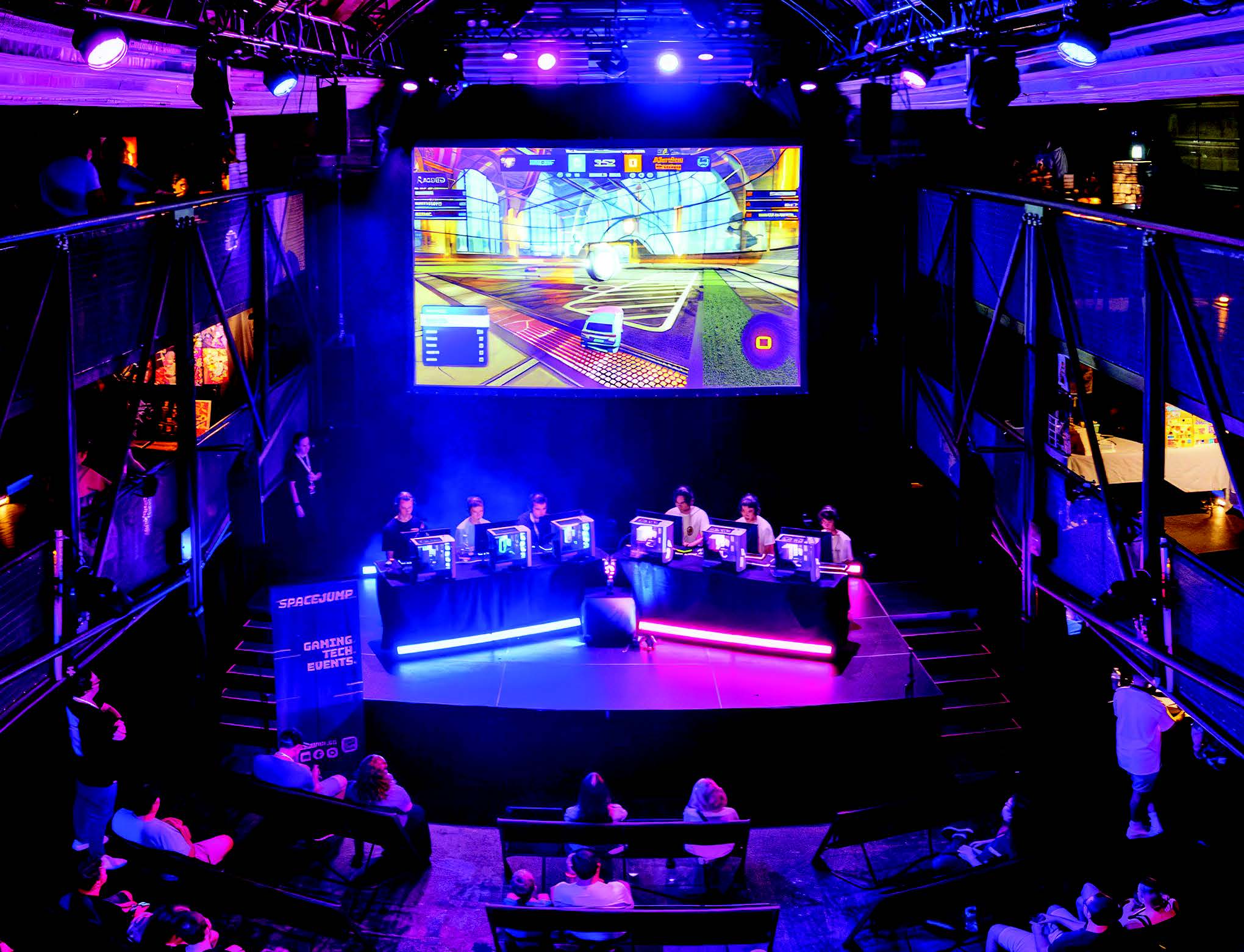
Recently, SPACEJUMP, an event management company and esports tournament organiser, hosted the Supersonic Cup Summer Major in Perth. SPACEJUMP’s mission is to develop gaming and esports industries in Australia by providing a platform for aspiring gamers and those who love esports.

Extron video extension, multi-window processing, streaming, and control technologies played a critical role in making the Supersonic Cup a success. Overall, the event was a demonstration of the transformative power of advanced AV solutions in the esports arena.

Challenges

The event organisers’ primary goal for the AV system was to ensure seamless, high-definition audio and video for both streaming and display. It was critical that the output of the system could match the intensity and pace of the esports competition. The AV system also had to accommodate the varied formats and resolutions of competition video throughout the tournament.

The Supersonic Cup’s success hinged on flawless audiovisual execution. Every frame, transition, and audio cue had to be delivered with precision. Due to the unique demands of broadcasting a live esports event, they needed to design a flexible system that could support the real-time processing and high bandwidth output of the gaming systems. Reliability was a key factor for both participants and spectators.

Design Solution

SPACEJUMP and Extron collaborated closely on the system design, leveraging Extron’s expertise in AV solutions. The flexibility of Extron’s MGP 641 xi multi-window processor combined with Extron Control allowed for fast, real-time adjustments and quick configuration changes for each segment of the event, from individual matches to the grand finale.

Vivid Multi-Window Video Processing

The Extron MGP 641 xi multi-window processor played a pivotal role in enhancing the viewing experience. Capable of scaling and presenting up to four 4K/60 source signals on a single screen, the MGP 641 allowed for dynamic layouts, including windowed presenter MC’s and side-by-side comparisons of live gameplay, critical in tournaments where multiple perspectives enhance the viewer’s understanding and enjoyment. Extron’s Vector™ 4K scaling technology provided unparalleled image quality, making every detail of the fast-paced action crystal clear.

Extensive Live Streaming Capabilities

Live streaming is a major factor in the popularity of esports events, and conveying the onsite excitement sufficiently to a remote audience can be challenging. Delays, interruptions, and poor audio or video quality in the live stream can cause viewers to tune out. To stream the gaming action from the event directly to Twitch, system designers selected the Extron SMP 351 Streaming Media Processor.

The SMP 351 is able to stream content at two different resolutions and bit rates concurrently. This dual-streaming capability was crucial for helping the Supersonic Cup reach a wider audience with varied internet speeds and device capabilities. By offering a high-resolution stream for viewers with robust internet connections and a lower-resolution option for those with limited bandwidth, event organisers were able to ensure every viewer had an enjoyable experience.

User-Friendly System Control

The Extron TLP Pro 1025T, a 10″ Tabletop TouchLink Pro Touchpanel, was the interface of choice for controlling the AV system. It provided a user-friendly platform for rapid switching between video inputs, essential for an esports event where transitions between games, player viewpoints, and other visual elements are frequent and must be flawlessly executed. The touchpanel’s ease of use and reliability meant that the technical team could focus on the event rather than managing the technology, ensuring smooth operations throughout.

Additionally, the system’s flexibility was highlighted by a custom graphical user interface (GUI) developed by Extron specifically for this event. This GUI allowed for modifications to inputs on-the-fly, demonstrating the adaptability of Extron’s system to dynamic event requirements. This capability to create, modify, and upload code effortlessly on-site was instrumental in the flawless execution of the event, ensuring all changes were handled seamlessly without disrupting the live experience.

Results

The use of Extron technologies at the Supersonic Cup Summer Major 2024 was a resounding success. The seamless integration of audio and video over IP, coupled with high-fidelity streaming and display capabilities, provided an immersive and dynamic viewing experience that captivated audiences both onsite and online. The reliability and performance of the AV system enabled SPACEJUMP to focus on delivering an exceptional event, free from the technical glitches that can detract from the esports experience.

“Extron’s products really helped elevate our production value and we were incredibly happy with the results,” said Alyssa Boyer, Founder and Managing Director at SPACEJUMP. “We received great feedback from players and spectators alike who were pleased with the improvements to the overall tournament experience.”

The positive feedback from participants, in-person spectators, and online viewers validated the choices made by the system designers and reinforces the importance of using a high-quality AV infrastructure for esports events. The Supersonic Cup not only achieved its goal of fostering the local esports community but also set a new standard for event production quality in the industry.

The collaboration between SPACEJUMP and Extron for the Supersonic Cup Summer Major 2024 exemplifies the critical role of advanced AV technologies in the success of modern esports events. By leveraging Extron’s MGP 641 xi multi-window processor, SMP Streaming Media Processor, and TLP Pro touchpanel control, SPACEJUMP was able to deliver an unparalleled competitive and spectator experience.

Featured Extron Products

– MGP 641 xi: 4K/60 HDMI Multi-Window Processor with DTP3 Extension
– SMP 351: H.264 Streaming Media Processor
– TLP Pro 1025T: 10″ Tabletop TouchLink Pro Touchpanel
– IPCP Pro 250: IP Link Pro Control Processor

More information